
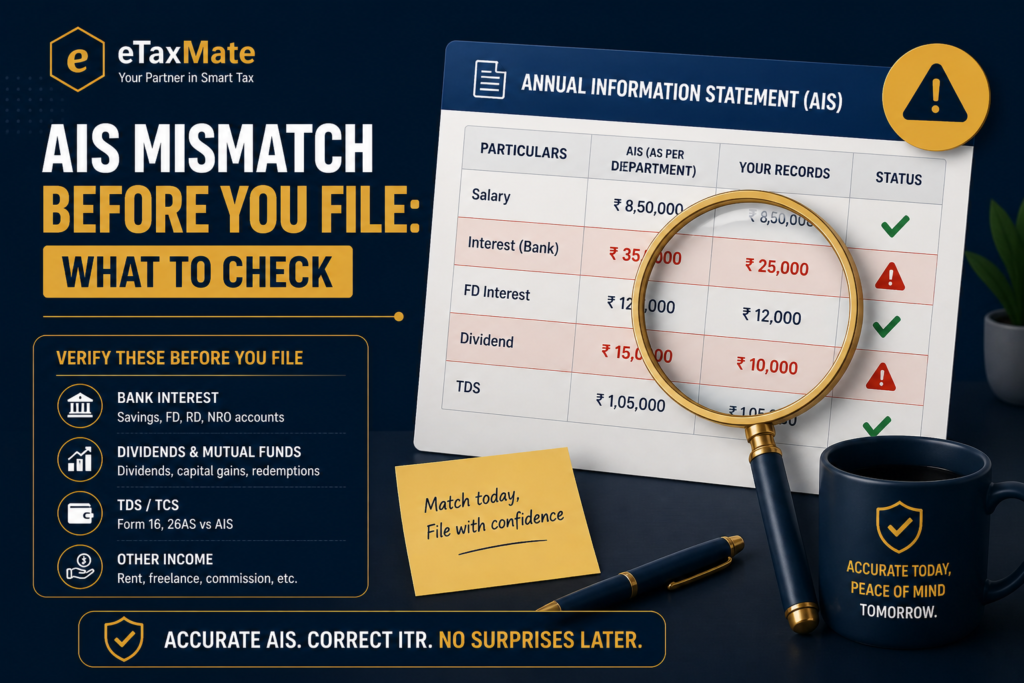
If your Annual Information Statement shows numbers that do not match your bank statements or salary slips, do not panic and do not file blindly. An AIS mismatch in ITR data is one of the most common reasons salaried filers, freelancers, and investors get a notice under Section 143(1) — and almost all of these notices are avoidable with a careful pre-filing check. The Income Tax Department has access to far more third-party data than most filers realise, and the AIS is where it shows up. This post explains what the AIS actually contains, the six entries you must verify before filing, and how to handle a discrepancy without delaying your return.
Quick answer
An AIS mismatch in ITR data must be reconciled before filing — not after. File with figures that match your own records, submit feedback on the AIS portal for incorrect entries, and keep documentary proof of every correction.
Before you file, check:
- Have you downloaded the latest AIS for the relevant assessment year?
- Have you cross-verified each major entry against your own records (bank, broker, employer)?
- Have you submitted feedback on the AIS portal for any entry that is wrong or duplicated?
What the AIS actually is, and why a mismatch matters
The Annual Information Statement is a comprehensive record of your financial transactions reported to the Income Tax Department by third parties — banks, mutual funds, brokers, employers, the Sub-Registrar, and many others. It was rolled out by the CBDT in November 2021 to replace and expand the old Form 26AS, and it now includes data such as savings interest, dividend income, share transactions, mutual fund redemptions, foreign remittances, and high-value cash deposits.
The mismatch matters because the department’s Computer Assisted Scrutiny System automatically flags returns where ITR figures diverge meaningfully from AIS figures. A mismatch does not mean wrongdoing — but it does mean a notice. And once a notice is issued, the burden of proof shifts to you to explain the difference.
The AIS works under Section 285BA of the Income Tax Act 1961, which obliges specified entities to file a Statement of Financial Transactions for high-value transactions. Under the Income Tax Act 2025, the framework continues with substantially the same scope.
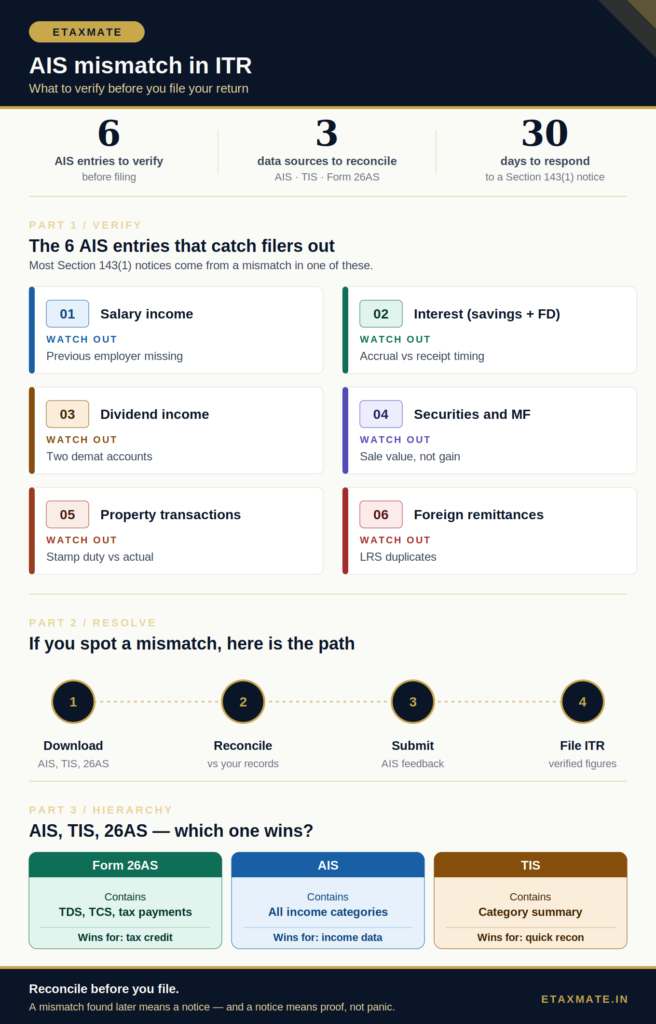
The 6 AIS entries you must verify before filing
These are the entries where mismatches happen most often, and where the correction effort is highest if caught after filing.
1. Salary income
Match the gross salary in Part B of your Form 16 against the salary entry in your AIS. The most common mismatch here is a previous employer’s salary missing from the AIS but present in your records, or vice versa. If you switched jobs during the year, both Form 16s must reconcile to the AIS total. A common fix is asking the previous employer to verify whether the TDS return was filed correctly.
2. Interest from savings and fixed deposits
Banks report interest on a financial-year basis. If your fixed deposit interest is reported on accrual but you have been declaring it on receipt, the AIS will show a higher figure. Reconcile each FD’s interest to the bank’s TDS certificate (Form 16A). Savings account interest above the Section 80TTA limit of ₹10,000 (or ₹50,000 for senior citizens under Section 80TTB) is also separately reported. Note that under the new regime, the Section 80TTA deduction is not available, but the interest itself must still be declared.
3. Dividend income
Companies and AMCs report dividends paid to you. If you hold shares in two demat accounts under the same PAN, the AIS should reflect both. Dividends are taxable in the hands of the shareholder under both the old and new regimes — there is no DDT exemption anymore, regardless of regime.
4. Securities and mutual fund transactions
Brokers report every purchase and sale. The AIS shows the gross sale value, not the capital gain. Many filers panic when they see a large sale value — but what matters for tax is the gain or loss, which you compute using the cost of acquisition. Reconcile the AIS entry against your broker’s capital gains statement, and check for any duplicated entries from corporate actions (bonus, split, buyback).
5. Property transactions
If you bought or sold property above ₹30 lakh, the Sub-Registrar reports it. If the buyer is the one with the AIS entry, the price shown is the consideration paid. Verify that the figure matches the registered sale deed exactly. A mismatch here often comes from stamp duty value being reported instead of actual consideration — the two can differ.
6. Foreign remittances and credit card spends
Outward remittances under the Liberalised Remittance Scheme and high-value credit card spends are reported by banks. NRIs and HNIs in particular should verify each LRS entry, as duplicate reporting from different banks is not uncommon. Foreign remittances are also relevant for residential status determination, which affects the entire ITR.
AIS, TIS, and Form 26AS — which one wins?
This is one of the most asked questions, and it causes real confusion.
The AIS is the comprehensive statement showing every transaction reported by every reporter. The TIS — Taxpayer Information Summary — is a simplified, category-wise summary derived from the AIS, with the department’s processed values. Form 26AS, since its 2021 revamp, focuses primarily on TDS, TCS, advance tax, self-assessment tax, and refunds.
For tax filing, the practical hierarchy is:
- Use Form 26AS for TDS and tax payment figures — these flow directly into the tax credit section of your ITR.
- Use AIS for income figures across all categories, especially income on which no TDS was deducted (low-interest savings, small dividends, certain capital gains).
- Use TIS as a quick reconciliation summary, but always drill into the AIS for the underlying entries.
If AIS and Form 26AS show different TDS figures, Form 26AS prevails for TDS credit purposes.
What to do if you find an AIS mismatch in ITR data
The AIS portal has a built-in feedback mechanism. Use it before filing — not after.
- Log in to the e-filing portal and download both the AIS and TIS PDFs (and the JSON, if you use software).
- Open each entry and compare it against your own records — bank statements, broker statements, Form 16, sale deeds, etc.
- For any entry that is incorrect, duplicated, related to another PAN, or already disclosed elsewhere, click the “Optional” feedback icon and select the appropriate response (Information is correct / Information is not fully correct / Information relates to other PAN/year / Information is duplicate / Information is denied).
- Submit the feedback. The system creates a modified value, but the original information remains visible.
- File your ITR using the figures you have verified — not the AIS figures by default. Keep documentary proof for every variation.
- If a mismatch is discovered after filing, you can still submit AIS feedback, and you can file a revised return under Section 139(5) before the assessment is completed.
Variations on this main path
- Mismatch found after filing: You can still submit AIS feedback, and you can file a revised return under Section 139(5) before assessment closes — by 31 March of the assessment year.
- Entry missing from AIS but present in your records: Always declare the income in your ITR. The AIS is not exhaustive — silence is not safety.
- Entry showing in someone else’s PAN: Use the “Information relates to other PAN/year” feedback option and notify the actual owner.
When you should not blindly trust the AIS
The AIS is a useful reconciliation tool, but it is not gospel. There are situations where the reader should step back and not simply copy AIS figures into the ITR.
- The AIS shows gross sale value, not gain. Filers sometimes report the AIS sale figure as income — that overstates tax massively. Always compute capital gain using the cost of acquisition.
- Duplicate entries from corporate actions. Bonus shares, splits, and buybacks can produce confusing AIS entries. Reconcile each against the broker’s contract notes.
- Reporting lag. AIS is updated through the year. An entry seen in May may differ from the same entry in July. Always download the latest version close to filing.
- The AIS is silent on exempt income. PPF interest, EPF maturity proceeds, agricultural income, and certain insurance receipts are often missing or partial. Declare exempt income in the appropriate ITR schedule regardless of AIS.
- TDS shown in AIS but not in Form 26AS. TDS credit flows from Form 26AS — not AIS. If the figures differ, follow Form 26AS for the credit and pursue the deductor for correction.
Documents and records to keep ready
Before you reconcile, gather:
- Latest AIS, TIS, and Form 26AS PDFs from the e-filing portal
- Form 16 from current and any previous employer
- Form 16A for FD interest, professional fees, and contractor TDS
- Bank statements for all savings and current accounts under the same PAN
- Broker capital gains statement and contract notes
- Mutual fund statement showing redemptions and dividends
- Sale deed or registration document for any property transaction
- Foreign remittance advice for LRS transactions
Final takeaway
An AIS mismatch in ITR data is not a problem if you find it before you file. It becomes a problem only when the return is submitted with figures that contradict third-party reporting — and the department’s automated systems will flag that within weeks. Treat the AIS as a starting point for reconciliation, not a final source of truth. Your own records, supported by primary documents, are what you ultimately defend in any notice. Verify, submit feedback where needed, and file with figures you can prove.
AIS-related confusion or need expert help with reconciling third-party data before filing? eTaxMate can help you review your AIS and TIS, identify mismatches, submit appropriate feedback, and file your ITR with verified figures.
This blog post is for general information only and does not constitute professional advice. Tax laws are subject to change and their application depends on individual facts and circumstances. Readers should consult a qualified professional before taking any action based on this content. eTaxMate accepts no liability for any action taken based on the information in this post.
Frequently Asked Questions
1. What is the AIS in income tax?
The Annual Information Statement is a comprehensive record maintained by the Income Tax Department of financial transactions reported against your PAN by third parties such as banks, brokers, employers, and the Sub-Registrar. It covers salary, interest, dividends, securities transactions, property purchases, foreign remittances, and more. It is downloadable from the e-filing portal and should be reconciled with your records before filing your ITR.
2. What happens if my ITR does not match the AIS?
A mismatch between the AIS and your filed ITR is automatically flagged by the department’s Computer Assisted Scrutiny System and typically results in a Section 143(1) notice asking for explanation. The mismatch itself is not wrongdoing, but it shifts the burden of proof to you. Reconciling AIS entries before filing — and submitting feedback for incorrect entries — avoids this entirely.
3. Can I correct a wrong entry in my AIS?
Yes. The AIS portal has a built-in feedback mechanism. For each entry, you can select options like “Information is not fully correct,” “Information relates to other PAN/year,” “Information is duplicate,” or “Information is denied.” The original entry remains visible, but a modified value reflecting your feedback is recorded. The reporter is notified to verify and update their filing.
4. Which one should I rely on — AIS, TIS, or Form 26AS?
Use Form 26AS for TDS, TCS, and tax payment figures, as it directly determines tax credit in your ITR. Use the AIS for income data across categories, especially incomes where no TDS is deducted. Use the TIS as a quick category-wise summary, but always drill into the underlying AIS for the actual entries when reconciling.
5. Is income missing from AIS still taxable?
Yes. The AIS is not exhaustive — it only contains transactions reported by entities under the Statement of Financial Transactions framework. Income such as freelance receipts from individual clients, small cash transactions, or certain rental income may not appear in the AIS at all. You must still declare every taxable receipt in your ITR. AIS silence does not equal exemption.
6. Can I file a revised return if I spot an AIS mismatch after filing?
Yes. Under Section 139(5) of the Income Tax Act 1961, a revised return can be filed before the assessment is completed or by 31 March of the assessment year, whichever is earlier. You can also submit AIS feedback at any time. If a Section 143(1) notice has already been received, respond to it within 30 days with supporting documents.